My Dashboard Login page is the official National Youth Service Corps page where every prospective Corps member and Corps member can log in to their dashboard.
In this post, I will show how to log in to your NYSC dashboard with an official super-fast link. I will also show you the 3 official links in case one is down or slow.
My Dashboard Login
Here are the fast links and the 3rd link is the fastest link to log in to your NYSC dashboard. Try it now.
- https://portal.nysc.org.ng/nysc1/
- https://portal.nysc.org.ng/nysc2/
- https://portal.nysc.org.ng/nysc3/
These 3 links above will take you directly to the NYSC login portal where you will log in with your Gmail and password.
The 3rd link is the fastest of all the links above. The first link is what everybody knows. And because it’s the most popular, anytime there is traffic on the NYSC website, everybody always uses the first link. Which usually results in a very slow server issue.
However, with the second and third links, you will be able to access the NYSC Portal very fast and easily even when the first one is busy.
You can use the NYSC official website links above on your smartphone and on a PC. The link will work well as long as you have an Internet connection.
Also, I will recommend Chrome, Firefox, explorer and other browsers for fast navigation. After you click the link, enter your Gmail and password and click Resume.
Steps To Login To The NYSC Dashboard
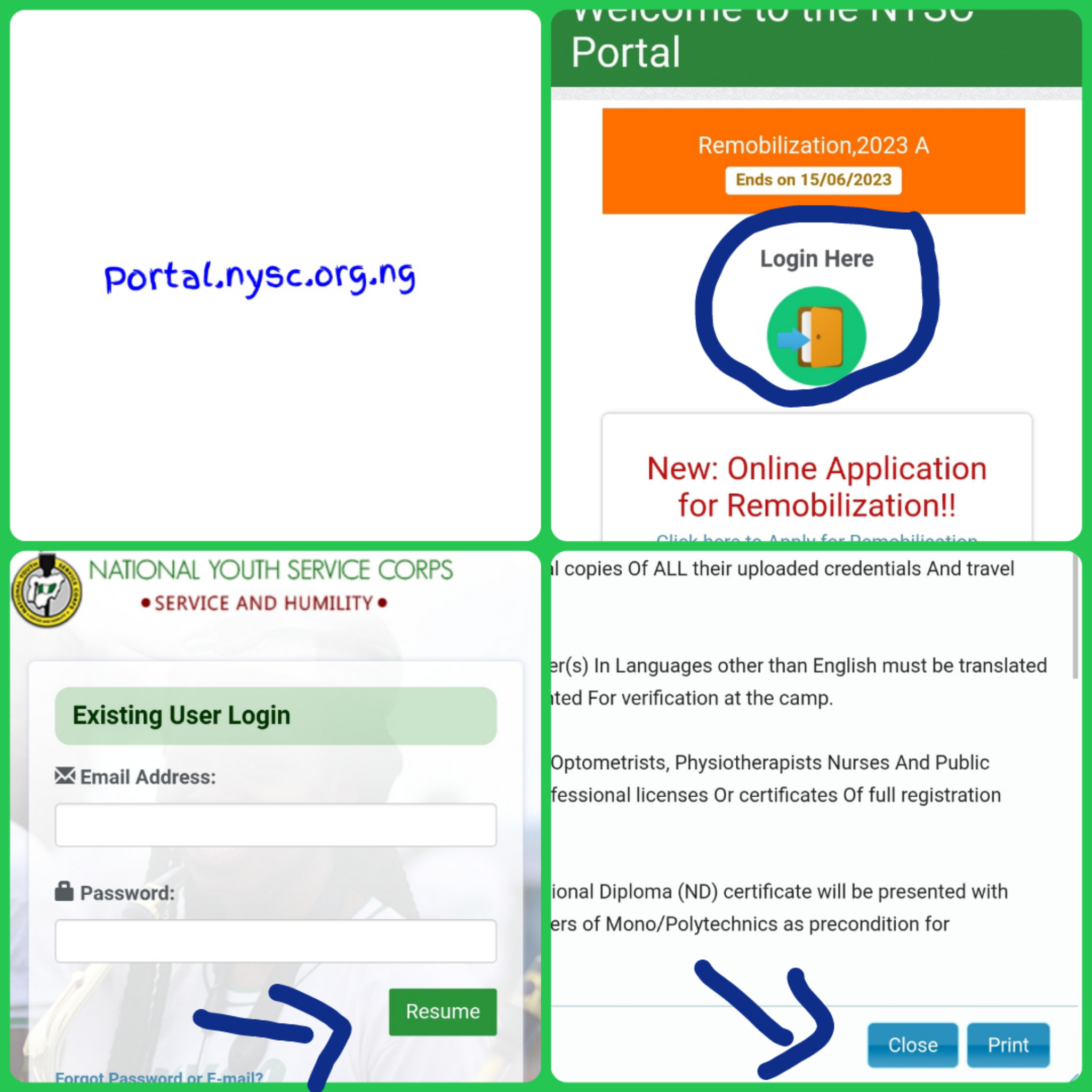
Things You Can Do On Your Dashboard
There are a lot of things you can do right on your dashboard and in this section, I will discuss briefly about them. In fact, you can do everything that have relation to NYSC from your dashboard.
Printing Of Call-up Letter
The NYSC call-up letter is an official document that will show your state of deployment for the 12 months mandatory service.
Once you login to your NYSC dashboard, you will be able to see your call-up letter and also print.
How To Print NYSC call-Up Letter
1. Go to portal.nysc.org.ng
2. Click on Login Here
3. Enter your Gmail and password
4. Click resume
5. Close the pop up
6. Scroll down and you will see Print Call-up Letter. Click on that.
7. Click download
8. Copy it to your flash drive or take it to the nearest cyber cafe for printing.
Green Card
The NYSC Green card is also an official document that will display all your details and personal information after the online registration.
If you want to print yours, you can do that through the NYSC dashboard.
How to Print NYSC Green Card
1. Go to Portal.nysc.org.ng
2. Click on the Login Here button
3. Fill in your Gmail and password
4. Click resume
5. Close the pop up
6. Scroll down till you see Print slip and click on it.
7. Download it and go to a close by cyber café to print it on an A4 paper.
NYSC Relocation letter
Another thing you can do on your dashboard login is print relocation letter. You can also apply for relocation from your dashboard once you login.
How To Print NYSC Relocation Letter
1. Click on https://portal.nysc.org.ng/nysc1/
2. Enter your Gmail and password
3. Click resume
4. Close the pop up and scroll down.
5. Click relocation.
6. Click Print relocation letter. Remember that you will have to make payment of 1k.
7. Make payment
8. Download the relocation letter
9. Take it to the cyber cafe for printing.
There are several things you can do on your NYSC dashboard from checking your clearance schedule to other options.
Once you are able to login, check around your profile and you will see a lot of options that you have the ability to work by.
How do I check my dashboard NYSC?
Follow these steps below.
1. Go to the NYSC portal login page with this link portal.nysc.org.ng
2. Click Login Here
3. Enter your Gmail and password
4. Click Resume
The page will redirect you to your NYSC dashboard and you can do whatever you want to do from there.
You can do this on your smartphone as long as you have an Internet connection.
How do I check my call up letter on NYSC portal?
Follow these steps below. It’s easy and fast.
1. Click portal.nysc.org.ng to go to the NYSC portal login page.
2. Click on
3. Enter your Gmail and password
4. Click Login Here
5. Enter your Gmail and password
6. Click Resume
7. Close the pop up
8. Scroll down and click Print Call-up Letter.
The next page will load your call up letter and you will be able to see your state of deployment.
You can only be able to print your call-up letter if the official call-Up letter is out and if you made payment of 3k during your online registration.
My NYSC Dashboard
Click https://portal.nysc.org.ng/nysc3/ and enter your gmail and password. Then click resume and you will be in your dashboard asap.
The link above is the official NYSC login portal. It should work on all smartphone as long as you have an Internet connection.
In conclusion, if you are looking for mys dashboard login, My NYSC Dashboard, nysc portal login dashboard, www.nysc portal.com dashboard, www.nysc.com dashboard, Login nysc dashboard, NYSC Dashboard Login, Dashboard Login NYSC, Dashboard Login NYSC, www.nysc dashboard.com and other searchers related to NYSC portal, I believe this post has solved all your searches.
Thank you for reading. Please share because sharing is caring.