Do you want to know how to print NYSC Green Card? This post will show you exactly how to do that. By the time you read this post to the end you will know all the steps and also be able to print your green card straight away.
You don’t need to go to a cyber café or look for a system to use. You can it all by yourself right on your smartphone. Before I show you how to print this card, you should know that only those who have completed their National Youths Service Corps registration are the only ones that will have access to the green card. [Read also: NYSC Green Card – Details, Print, And Sample]
How To Print NYSC Green Card
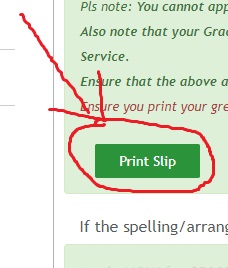
To print your NYSC Green card is easy and it’s just a few clicks. The first thing is to CLICK HERE to login to your NYSC dashboard, scroll down and click print slip. You can then download the PDF on your phone and go to a cyber café or anywhere they have a printer and just print it. It’s as easy as that.
As long as you have an Internet connection, you should be able to print the green card easily. You can use any browser. Chrome, Firefox and other browsers will work very well. [Read also: NYSC Green Card Printing – Colored Or White & Black?]
The NYSC Green card is a document that contains all your personal information. It’s evidence of a successful NYSC registration and it is also mandatory in camp. You have to take it to camp and without it, you will not be allowed to get inside any orientation camp in Nigeria. [Read also: NYSC Green Card Sample – Official Picture]
Another important thing to know is that you should never share your green card online or on any social media because it contains some important personal and sensitive details about you.
Now you know how to print your NYSC Green card, you can use the comment section below to ask all your questions and I will respond with a speed of light.
Please kindly share because sharing is caring.